Learning about British Values can help you:
|
Understanding Life in the UK |
Personal Development |
|
|
|
|
|
|
|
|

British Values
Gloucestershire Virtual School has developed a range of online learning modules to help young people who are new to the UK develop their understanding of British Values and life in the United Kingdom.
These values focus on both our rights and responsibilities and help promote an inclusive and diverse society. The five key British Values are:
|
British Value |
What It Means |
|
Democracy |
Having a voice and being able to take part in decisions |
|
Rule of Law |
Understanding and following laws that help keep people safe |
|
Individual Liberty |
Having freedom to make choices and express yourself responsibly |
|
Mutual Respect |
Treating others with kindness, fairness and consideration |
|
Tolerance |
Respecting people with different beliefs, cultures and backgrounds |
The GCC Virtual School E-Learning Platform provides access to interactive learning opportunities covering key information, rights, responsibilities and values that help people live together safely and respectfully in a diverse society.
To access the platform, click on the picture.
Learning about British Values can help you:
|
Understanding Life in the UK |
Personal Development |
|
|
|
|
|
|
|
|
Learning about British Values can help you:
|
Understanding Life in the UK |
Personal Development |
|
|
|
|
|
|
|
|
British Values Learning: Step-by-Step Registration Guide
Gloucestershire Virtual School provides an eLearning platform for British Values courses in several languages. This guide explains how to choose a translated course, register your details and access your learner login.
|
What you will need |
What you will do |
|
Your name and email address |
Select the correct British Values course language and complete registration |
|
Support from your carer or support worker if needed |
Check your basket and wait for your welcome email |
Open the GCC Virtual School eLearning platform: https://virtualschoolgcc.dreams-lms.org

Click the Courses tab at the top of the page, or go directly to: https://virtualschoolgcc.dreams-lms.org/courses
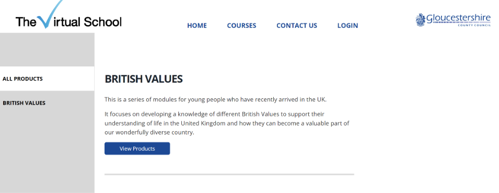
Click View Products to see the British Values courses available in different languages. Current languages include Arabic, English, Pashto, Persian and Vietnamese.
You can also go directly to: https://virtualschoolgcc.dreams-lms.org/category/british-values
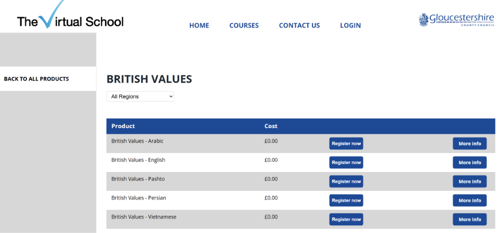
Find the course in the language you want to use. Click Register Now next to that course.
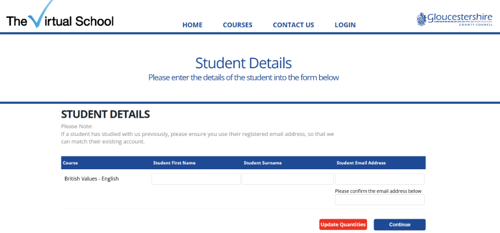
Enter your name and email address. If you are not sure which email address to use, ask your carer or support worker for help. When you have entered your details, click Continue.
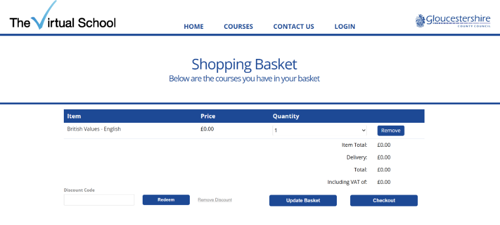
If you see more than one item/language in your basket, click Update Quantities, then either click the remove button or select the quantity drop-down option and select 1. After either removing or updating the basket, click Update Basket and then Checkout.
Your basket will show the course and language you selected. Check that the details are correct, then click Checkout.
After you register, you will receive a welcome email. This email will include your username, instructions for setting your password and a direct link to the learner login page. Check your junk or spam folder if you cannot see it.
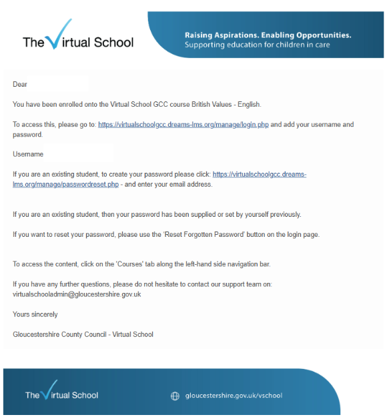
Step 8: Setting your password
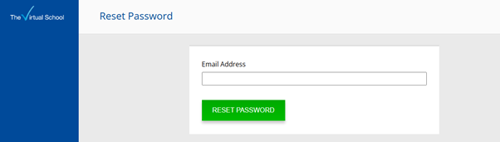
On the welcome email, follow the link to set your password. Enter the email address you used when registering and click Reset Password.
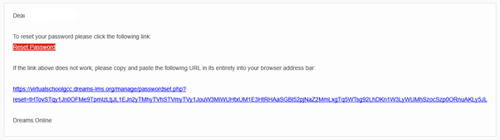
You will receive an email with a link to set your password. Enter your password and click Set Password. Upon doing this, you will be logged directly into your account.
Step 9: Complete your personal details
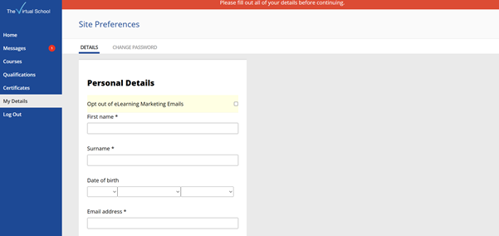
When you are logged in for the first time, you will be asked to complete your personal details. Fill in the required information, then click Save Details.
Step 10: Wait for account approval
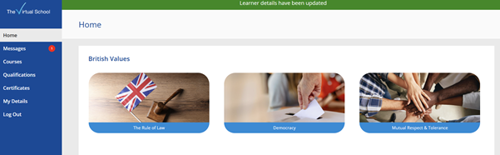
After you have completed your personal details, you may see the British Values courses on your home page. You will not be able to start the course until your account has been approved by Virtual School. Please wait for the confirmation email before starting.
Step 11: Approval and access granted
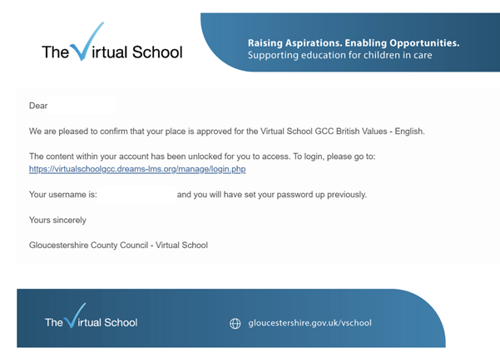
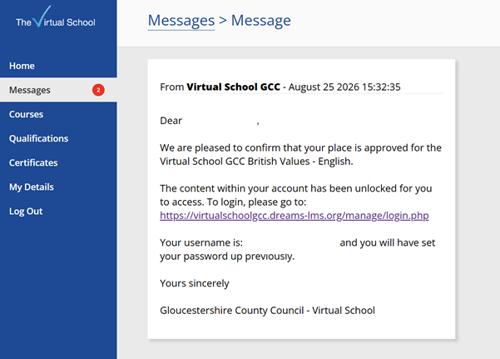
Once Virtual School approves your account, you will receive a confirmation email. You may also see a message on your account confirming that access has been granted.
Once Virtual School approves your account, you will receive a confirmation email. You may also see a message on your account confirming that access has been granted.
Step 12: Logging back into your account
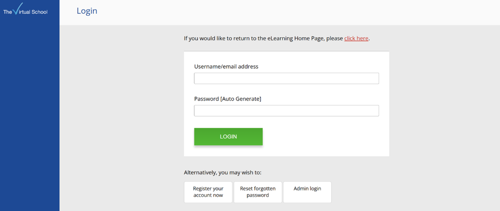
The next time you want to login to your account, open the learner login link on either your welcome email, or your approval email. Login using the username provided in the email and the password you have set.
If you forget your password, click Reset forgotten password on the login page and follow the instructions.
Step 13: Start the course modules
You can now access the British Values modules in your chosen language.
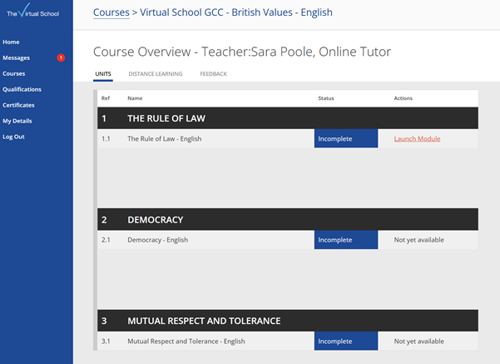
On your left-hand side navigation bar, click Courses to view the content. You will need to start with Rule of Law. Complete each module in order to unlock the next module.
Step 14: Complete each module and quiz
Work through the course content at your own pace. At the end of each module, complete the short quiz to check your understanding. When you pass the quiz, you can download your certificate and move on to the next module.
|
Rule of Law
|
Democracy
|
|
Mutual Respect and Tolerance
|
Individual Liberty COMING SOON |
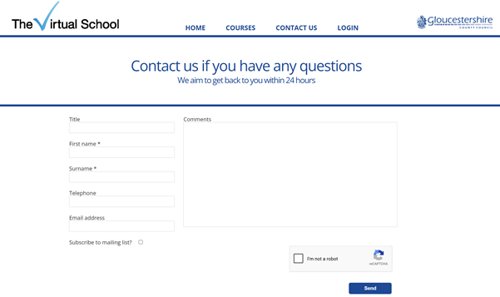
If you need help with any of the steps, click Contact Us at the top of the page.
In the comment box, please start your message with BRITISH VALUES QUERY. This will help your message reach the right person as quickly as possible.
British Values Learning: Step-by-Step Registration Guide
Gloucestershire Virtual School provides an eLearning platform for British Values courses in several languages. This guide explains how to choose a translated course, register your details and access your learner login.
|
What you will need |
What you will do |
|
Your name and email address |
Select the correct British Values course language and complete registration |
|
Support from your carer or support worker if needed |
Check your basket and wait for your welcome email |
Open the GCC Virtual School eLearning platform: https://virtualschoolgcc.dreams-lms.org
Click the Courses tab at the top of the page, or go directly to: https://virtualschoolgcc.dreams-lms.org/courses
Click View Products to see the British Values courses available in different languages. Current languages include Arabic, English, Pashto, Persian and Vietnamese.
You can also go directly to: https://virtualschoolgcc.dreams-lms.org/category/british-values
Find the course in the language you want to use. Click Register Now next to that course.
Enter your name and email address. If you are not sure which email address to use, ask your carer or support worker for help. When you have entered your details, click Continue.
If you see more than one item/language in your basket, click Update Quantities, then either click the remove button or select the quantity drop-down option and select 1. After either removing or updating the basket, click Update Basket and then Checkout.
Your basket will show the course and language you selected. Check that the details are correct, then click Checkout.
After you register, you will receive a welcome email. This email will include your username, instructions for setting your password and a direct link to the learner login page. Check your junk or spam folder if you cannot see it.
Step 8: Setting your password
On the welcome email, follow the link to set your password. Enter the email address you used when registering and click Reset Password.
You will receive an email with a link to set your password. Enter your password and click Set Password. Upon doing this, you will be logged directly into your account.
Step 9: Complete your personal details
When you are logged in for the first time, you will be asked to complete your personal details. Fill in the required information, then click Save Details.
Step 10: Wait for account approval
After you have completed your personal details, you may see the British Values courses on your home page. You will not be able to start the course until your account has been approved by Virtual School. Please wait for the confirmation email before starting.
Step 11: Approval and access granted
Once Virtual School approves your account, you will receive a confirmation email. You may also see a message on your account confirming that access has been granted.
Once Virtual School approves your account, you will receive a confirmation email. You may also see a message on your account confirming that access has been granted.
Step 12: Logging back into your account
The next time you want to login to your account, open the learner login link on either your welcome email, or your approval email. Login using the username provided in the email and the password you have set.
If you forget your password, click Reset forgotten password on the login page and follow the instructions.
Step 13: Start the course modules
You can now access the British Values modules in your chosen language.
On your left-hand side navigation bar, click Courses to view the content. You will need to start with Rule of Law. Complete each module in order to unlock the next module.
Step 14: Complete each module and quiz
Work through the course content at your own pace. At the end of each module, complete the short quiz to check your understanding. When you pass the quiz, you can download your certificate and move on to the next module.
|
Rule of Law
|
Democracy
|
|
Mutual Respect and Tolerance
|
Individual Liberty COMING SOON |
If you need help with any of the steps, click Contact Us at the top of the page.
In the comment box, please start your message with BRITISH VALUES QUERY. This will help your message reach the right person as quickly as possible.