
Find out who is managing the roads in your area:
Maps and schedules
Use the maps below to find out more about how we manage your roads and view current or planned maintenance works.
Find out who is managing the roads in your area:
The Causeway One Network map shows all planned roadworks across the county, by utility companies, the council and other contractors.
View the Causeway one.network roadworks map.
The Causeway One Network map shows all planned roadworks across the county, by utility companies, the council and other contractors.
View the Causeway one.network roadworks map.
Find it
Find out about work we are carrying out near you. Search for your street and use the left hand menu to select work programmes such as grass cutting:
How to use the map
- Search: Click on 'Address Search' at the top of the map and select a search option 'Address Search' and a search box will appear to enter details.
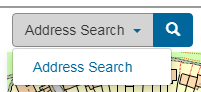
- Zoom: To zoom in and out:
a. Use the + and – buttons on the map
b. Computer: Use the mouse wheel to zoom in and out.
c. Smart device: Pinch the screen with two fingers to zoom in and out
- Layers: The majority of Find It layers become active from zoom level 14 to 17, however layers have to be activated under 'Show Layers' by selecting FindIt on the left hand side and ticking the grey boxes.
- Information: For further details, click on the symbols that appear and details will be shown.
Disclaimer: The information on this map is as accurate as we can present within the limitations of an online system. It is not a definitive map and cannot be used in any kind of legal proceedings as evidence of existence or location of any feature or asset.
Inspection reports: These reports are accurate and represent the state of the road at the last inspection. We encourage you to extract and use this data before you submit any other request for information.
Street lights: Select street lights to see those on your street, or faulty street lights for those Skanska are due to repair.
Find it
Find out about work we are carrying out near you. Search for your street and use the left hand menu to select work programmes such as grass cutting:
How to use the map
- Search: Click on 'Address Search' at the top of the map and select a search option 'Address Search' and a search box will appear to enter details.
- Zoom: To zoom in and out:
a. Use the + and – buttons on the map
b. Computer: Use the mouse wheel to zoom in and out.
c. Smart device: Pinch the screen with two fingers to zoom in and out - Layers: The majority of Find It layers become active from zoom level 14 to 17, however layers have to be activated under 'Show Layers' by selecting FindIt on the left hand side and ticking the grey boxes.
- Information: For further details, click on the symbols that appear and details will be shown.
Disclaimer: The information on this map is as accurate as we can present within the limitations of an online system. It is not a definitive map and cannot be used in any kind of legal proceedings as evidence of existence or location of any feature or asset.
Inspection reports: These reports are accurate and represent the state of the road at the last inspection. We encourage you to extract and use this data before you submit any other request for information.
Street lights: Select street lights to see those on your street, or faulty street lights for those Skanska are due to repair.
From overgrown hedges and blocked drains, to potholes, pavements and streetlights, all kinds of issues can be reported online.
We inspect the roads throughout the year, but issues can develop quickly - you can help by letting us know if you spot a problem.
Use the Fix My Street map to make a report.
We will investigate and keep you updated.

From overgrown hedges and blocked drains, to potholes, pavements and streetlights, all kinds of issues can be reported online.
We inspect the roads throughout the year, but issues can develop quickly - you can help by letting us know if you spot a problem.
Use the Fix My Street map to make a report.
We will investigate and keep you updated.
We carry out a number of routine highways maintenance tasks during the year. Find out what we do and when:
We carry out a number of routine highways maintenance tasks during the year. Find out what we do and when:
This map shows maintenance work planned by Gloucestershire County Council for the next five weeks. Jobs include minor roadworks such as drainage works, signage and patching.
This map shows maintenance work planned by Gloucestershire County Council for the next five weeks. Jobs include minor roadworks such as drainage works, signage and patching.