
Local Habitat Map

The local habitat map can be viewed below, or in full here
The key statutory elements of the mapping are:
Areas of Particular Importance for Biodiversity – This shows Gloucestershire’s existing designated sites, such as Sites of Special Scientific Interest and Special Areas of Conservation, and irreplaceable habitats such as ancient woodlands.
Areas that Could Become of Importance for Biodiversity – This area is made up of Potential Measures, which are mapped in areas identified as strategic for nature recovery. They show the best places for habitat creation, or management / restoration of existing sites. The habitat measures can be used to gain higher uplift on Biodiversity Net Gain projects, and have the potential to direct where funding for nature recovery projects goes.
To request the shapefiles for the APIB and ACIB layers, please email us
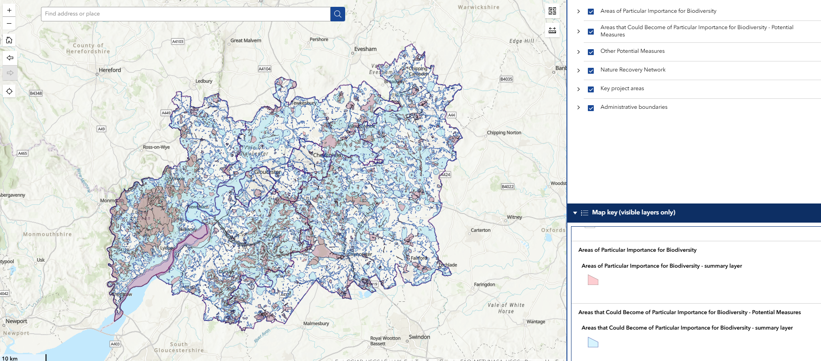
The Local Habitat map also lists a series of "Other Potential Measures" which are non-statutory, but are included to provide additional support and guidance to those designing nature recovery projects, or wanting to improve nature in their local area.
The Nature Recovery Network mapping was developed by the Gloucestershire Local Nature Partnership, and was a key tool in creating the LNRS Local Habitat Map. This mapping is available as a layer to allow users to compare the two. The full mapping can be viewed here
The Key Project Areas section shows a range of local nature recovery projects, and their working areas. Note that these are external projects and so projects areas may change over time. We will endeavour to keep these up to date, but please search the project online to see full details.
How to use the Mapping
The basic functions of the map include layers that can be ticked "on" or "off" using the check boxes in the layer menu. 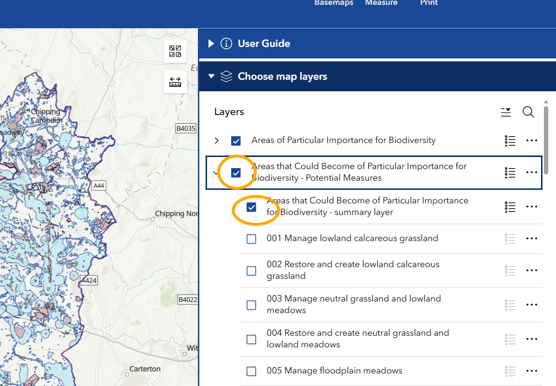
To find out what Potential Measures are present in a specific area, you can search a location using the search bar, or scroll and pan around the map using your mouse. You can then click on an area of interest and this will result in a pop up box appearing:
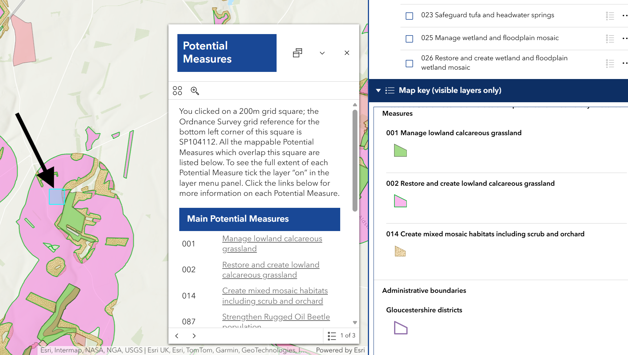
This allows you to then turn on the specific layers that are relevant for that area. This image shows that in the area selected (blue square), there are measures for managing calcareous grassland, restoring and creating calcareous grassland, and creating mixed mosaic habitats. The key on the right hand side shows the "symbology" or colour/pattern used for each layer.
Clicking on the Potential Measures that appear in the pop up box results in a pdf opening, which details the measure in full, explaining what actions should be taken to achieve that Measure, and links to resources and guidance.
for specific guidance on how to use the Local Habitat Map for Biodiversity Net Gain Projects, see the User Guide.
Local Habitat Map Video Guide
For a full tour and guide of how to use each feature of the mapping, you can watch the video below: